Maths › Decision Mathematics 1 › The Simplex algorithm
The Simplex algorithm
Graphical solution of a linear program is limited to two variables. The Simplex algorithm works algebraically instead, moving from vertex to vertex, never making the objective worse, and stopping when no move can improve the objective any further.
Builds on Linear programming: formulation and graphical solution and Matrix algebra and transformations.
IN THIS TOPIC
- Set up the initial tableau from a formulated problem.
- Choose the pivot column and row and carry out the row operations.
- Read the solution from a final tableau and recognise when to stop.
- Read what each constraint is worth off the objective row, and say what a change to a coefficient would do.
- Say why a ≥ constraint leaves no starting basis, and how the two-stage and big-M methods manufacture one from artificial variables.
COMMON MISCONCEPTION
The Simplex algorithm stops when the value in the bottom right corner stops increasing.
The stopping rule is a condition on the objective row: continue while any negative entry remains there and stop when none does, because then no variable can be increased without reducing P. Whether the value in the corner has moved is beside the point, since a degenerate problem can pivot and leave P exactly where it was, and quitting there stops short of the optimum.
Setting up and pivoting
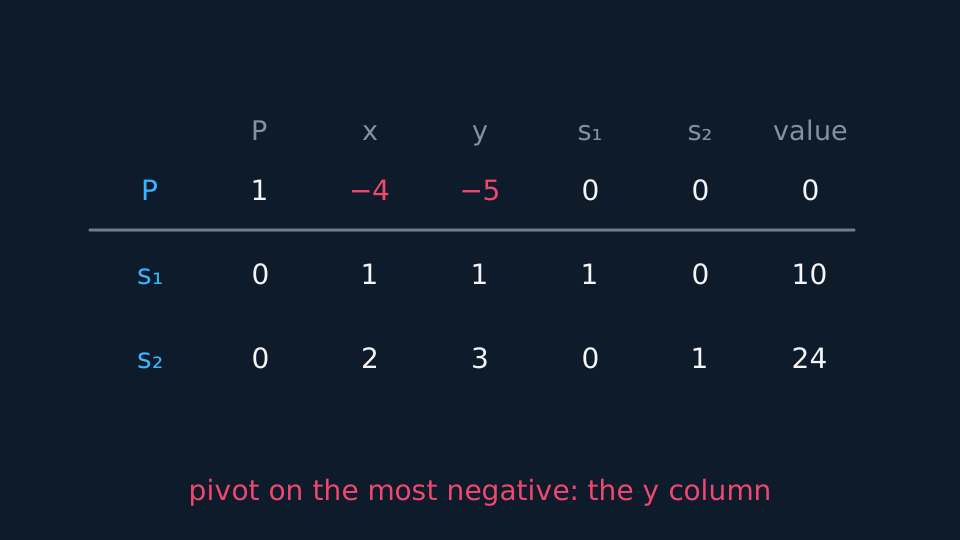
Add a slack variable to each constraint and write the objective as P − 4x − 5y = 0. The tableau then has one row per constraint and one for the objective, with the slack variables forming the starting basic solution. Every decision variable is zero, so you begin at the origin, a feasible corner here, because a ≤ constraint with a non-negative right-hand side is satisfied when everything is zero.
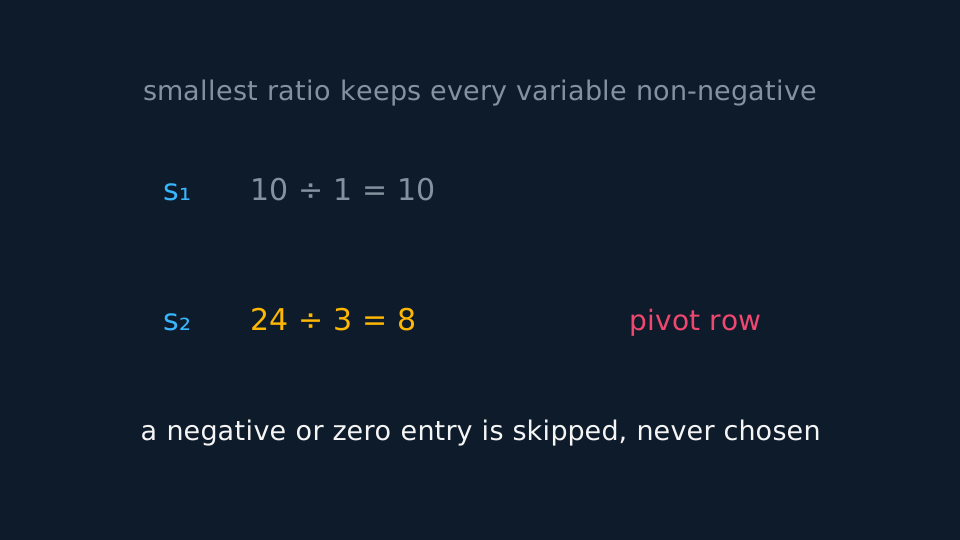
Each iteration has three steps. Choose the pivot column as the one with the most negative entry in the objective row, since increasing that variable improves P fastest. Choose the pivot row by the ratio test: divide each row's value by its entry in the pivot column and take the smallest non-negative result, skipping negative and zero entries entirely.
Then divide the pivot row by the pivot element, and add or subtract multiples of that row from the others until the pivot column has a one in the pivot row and zeros everywhere else.
WORKED EXAMPLE
The first pivot
Maximise P = 4x + 5y subject to x + y ≤ 10 and 2x + 3y ≤ 24.
The objective row is P − 4x − 5y = 0, so the most negative entry is −5 and the pivot column is y.
Ratio test: 10 ÷ 1 = 10 and 24 ÷ 3 = 8, so the pivot row is the second.
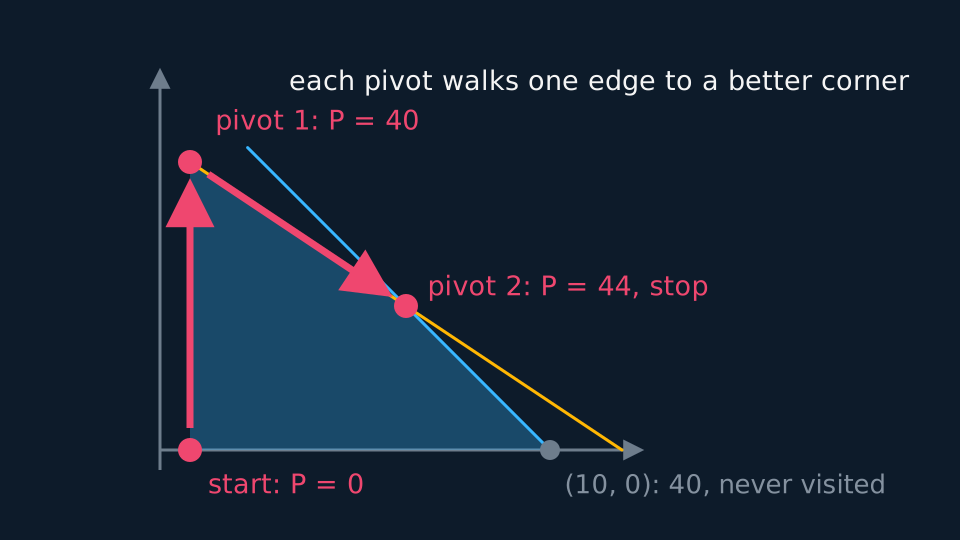
After pivoting, P = 40 with y = 8. The objective row still has a negative entry in x, so another iteration follows and finishes at P = 44 with x = 6, y = 4.
Stopping, and reading the answer
Under the convention used here the objective row of a maximisation tableau holds the negatives of the objective coefficients, so the algorithm continues while any negative entry remains in that row and stops when none does. At that point no variable can be increased without reducing P. That is a condition on the row, not on whether the corner value has changed: stopping as soon as an iteration leaves P where it was would quit too early on degenerate problems, which do just that.
Reading the answer off is mechanical. Any column that looks like a column of the identity gives a basic variable equal to its row's value, and every other variable is zero. To minimise instead of maximise, maximise the negative of the objective and change the sign back at the end.
What the tableau is doing algebraically is a walk round the corners of the feasible region you would have drawn for a two-variable problem, so the worked example can be checked against the graph.
The final tableau also says what a change to the problem would do, which a graphical solution shows by moving a constraint line or tilting the objective line. The entries left standing over the slack variables in the objective row are what one more unit of each resource is worth. In the tableau below they are 2 and 1, so raising the first constraint's limit by one raises P by 2, and raising the second's by one raises P by 1. The graphical solution agrees: at a limit of 11 the optimum moves to (9, 2) and P to 46.
Two cautions go with that reading. The rate holds while the same variables stay basic, which is over a range and not for ever, so a large change requires the problem to be solved again. And a change to a coefficient of the objective itself moves the objective row rather than the value column: if the entries all stay non-negative the same corner is still optimal, and if one turns negative there is another iteration to do and the answer moves to a different corner.
Describe the drawing
The feasible quadrilateral for the worked problem with the Simplex route drawn on it as two thick arrows: from the origin up the y axis to the corner at nought and eight, then along an edge to six and four. The objective climbs from zero to forty to forty-four, and the algorithm stops there because no edge leads anywhere better. The corner at ten and nought, worth only forty, is never visited.
GUIDED PRACTICE
Reading a final tableau
A final tableau has objective row P + 2s1 + s2 = 44, and rows giving x = 6 and y = 4. State the solution and explain how you know it is optimal.
Show the working
No entry in the objective row is negative, so no variable can be increased to improve P: the tableau is optimal.
x = 6, y = 4, and the slack variables are non-basic so s1 = s2 = 0.
P = 44, read from the value column of the objective row.
Both slacks being zero says both constraints are tight, which matches the graphical answer at the intersection.
The 2 and the 1 standing over the slacks say what each constraint is worth: one more unit of the first adds 2 to P and one more of the second adds 1. Raising the first limit from 10 to 11 does move the optimum to (9, 2) with P = 46.
Constraints that break the starting basis
Ordinary Simplex starts from the free corner the slack variables provide: with ≤ constraints and non-negative right-hand sides, the origin is feasible and the slacks are the starting basic solution. A ≥ constraint with a positive right-hand side breaks that. The origin no longer satisfies it, and subtracting a surplus variable leaves no obvious basic feasible solution to pivot from, so a starting point has to be manufactured. Both methods on the specification do that with artificial variables.
The two-stage method spends its first stage minimising the sum of the artificial variables. When that sum reaches zero the tableau sits at a genuine feasible corner, and ordinary Simplex takes over for the second stage. The big-M method instead subtracts a large multiple M of each artificial variable from the objective, which makes keeping them positive so expensive that the algorithm drives them out on its own. Either way, check at the end that every artificial variable has come back to zero.
ASSESSMENT FOCUS
- Write the objective row with the signs reversed, as P − 4x − 5y = 0.
- Show the ratio test in full, including the entries you skipped and why.
- State the row operations you performed, in the form 'row 1 minus row 2'.
- Stop only when no negative entries remain in the objective row, and say that is why you stopped.
- Give the values of the slack variables as well as x and y; each one states how much of its constraint is unused.
- Asked what raising a constraint's limit would gain, read the entry over that slack variable in the final objective row and say the rate holds over a range only.
- After a two-stage or big-M run, confirm the artificial variables have returned to zero.
CHECK YOURSELF
In a tableau the pivot column entries are 2, −1 and 4, with values 12, 8 and 20. Which row is the pivot row?
Show a hint
Skip the negative entry.
Show the answer
Ratios are 12 ÷ 2 = 6 and 20 ÷ 4 = 5; the −1 is skipped entirely. The smallest is 5, so the third row is the pivot row.
Choose the pivot column by the most negative entry in the objective row.
Choose the row by the smallest non-negative ratio of value to pivot-column entry, skipping negative and zero entries.
Stop when no negative entries remain in the objective row; ≥ constraints need the two-stage or big-M method to get started.
WORKBOOK
Printable practice for this topic: original exam-style questions with room to work, and a fully worked answer book. Free to use; please do not redistribute or sell.
Or read them with their worked answers on the Simplex algorithm questions page.
CHECK YOUR PROGRESS
Rate how confident you feel with each objective for this lesson. Ratings are saved in this browser, on this device, unless you sign in.
- Set up the initial tableau from a formulated problem.
- Choose the pivot column and row and carry out the row operations.
- Read the solution from a final tableau and recognise when to stop.
- Read what each constraint is worth off the objective row, and say what a change to a coefficient would do.
- Say why a ≥ constraint leaves no starting basis, and how the two-stage and big-M methods manufacture one from artificial variables.
Open the full revision checklist to see every objective in the course in one place.